DCP Setup Maker0.9
Publisher Description
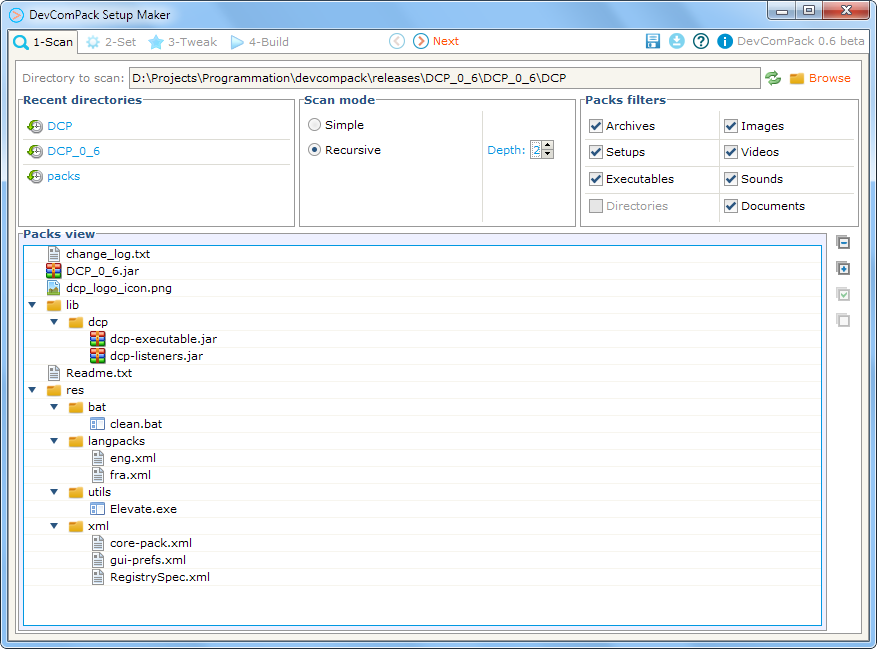
Open source application that generates Java installers, using IzPack, for a set of packages and applications as executable jar file.
It is mainly about creating installers for what you need quickly and efficiently, following 3 simple steps: Scan, Set and Tweak to Build your package.
1 - Scan the directory containing the files you want to include in your package.
2 - Set the parameters for your packs, including what depends on what, what is required, what must be executed...
3 - Tweak the final custom settings for your application to be ready.
Powered by IzPack, Apache Pivot, Apache Ant, StaxMate, Woodstox, TrueZip, WinReg
About DCP Setup Maker
This program is available in Java. It was last updated on 29 September, 2026. DCP Setup Maker is compatible with the following operating systems: Linux, Mac, Other, Unix, Windows, Windows-mobile.
The company that develops DCP Setup Maker is DCP. The latest version released by its developer is 0.9. This version was rated by 5 users of our site and has an average rating of 2.0.
The download we have available for DCP Setup Maker has a file size of 21.0 MB. Just click the green Download button above to start the downloading process. The program is listed on our website since 2013-10-17 and was downloaded 508 times. We have already checked if the download link is safe, however for your own protection we recommend that you scan the downloaded software with your antivirus. Your antivirus may detect the DCP Setup Maker as malware if the download link is broken.
How to install DCP Setup Maker on your Windows device:
- Click on the Download button on our website. This will start the download from the website of the developer.
- Once the DCP Setup Maker is downloaded click on it to start the setup process (assuming you are on a desktop computer).
- When the installation is finished you should be able to see and run the program.
Program Details
System requirements
Download information
Pricing
Version History
version 0.9
posted on 2013-10-17
0.9 changelog:
+Bug fixes
+JSON integration for advanced settings
+Fixed for Linux based systems (tested on Ubuntu 13.04)
+New options for Setup window size control
+Helper assistant display binded to the current step
+More detailed assistant tips
+Scroll enabled for Tweak form
+Install Path suggestions from other packs' install paths included
+Dependency options integrated for multi packs selection
+Advanced install groups managing for multiple packs selection
+Save file path display on window title and * flag for unsaved edit
+Shortcuts defined (help, load, save, save as, undo, new group validate, next, previous)
